







Delve into the world of the extreme enthusiast user with the Big Bang Marshal Intel P67 motherboard with 24-Phase DrMOS, Lucid Hydra and 8 PCI-E and much more.
Product on Review: Big Bang Marshal
Manufacturer: MSI
Street Price: £260 inc. VAT
Since Intel’s Sandy Bridge launched at the beginning of the year, end users have had countless affordable and mainstream motherboards available at their finger-tips but not everyone wants a mainstream offering. Extreme enthusiasts had to wait a few more months before the hardcore offerings surfaced and today we are looking at one such product.

MSI have been on a campaign to arm their products, particularly motherboards with what they call Military Class II components. What they mean by this is, higher quality more durable componentry in and around the motherboard meaning that it will be able to sustain extreme usage and stand the test of being put through its paces in the most exhausting of operations. Today we will be taking a look at the revered Big Bang Marshal. An extended ATX motherboard with an extensive feature-list – including 24-Phase DrMOS power design, 8 PCI-E for multi-GPU graphics with Lucid Hydra to mix NVIDIA and AMD graphics cards, Voltage Check-Points and much more! So let’s waste no further time and begin our analysis of MSI’s Big Bang Marshal.
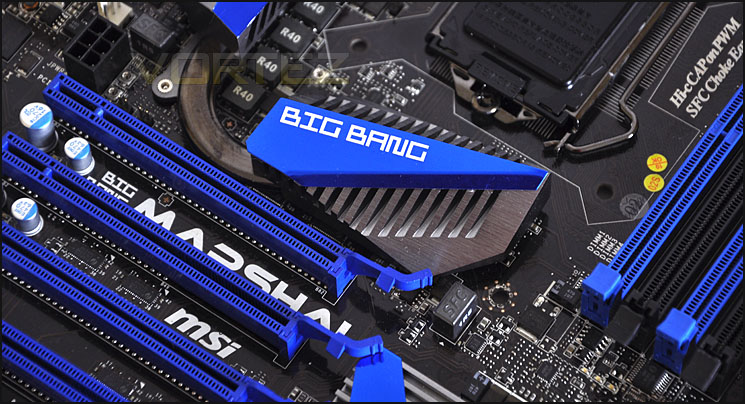
From the earliest Big Bang-Trinergy through the Big Bang-Fuzion to the Big Bang-XPower, the Big Bang Series tailored for gamers and extreme users has received unanimous acclaim from both the media and power users. In order to better impress consumers with premium products, apart from continuously enhancing product specifications, MSI has upgraded the conventional 2D vision to 3D vision. Along with the starlight background, MSI has not only extended the design consistency of the Big Bang Series, but also evolved the series to the brand new 3D version in order to fulfill the demand of power game users for powerful 3D effects.
In the new-generation Big Bang Series, product ranges have also been re-classified. These include two main ranges: Intel and AMD. In the Intel range, ZPower is equipped with the supreme Intel X-Series chipsets and Marshal with the Intel P-Series chipsets. The upcoming AMD’s product is called the Conqueror. By re-naming and re-positioning the Big Bang series, we hope to make things simpler and more convenient for consumers.
In the new-generation Big Bang Series, product ranges have also been re-classified. These include two main ranges: Intel and AMD. In the Intel range, ZPower is equipped with the supreme Intel X-Series chipsets and Marshal with the Intel P-Series chipsets. The upcoming AMD’s product is called the Conqueror. By re-naming and re-positioning the Big Bang series, we hope to make things simpler and more convenient for consumers.
Specifications (Detailed Speficiations)
Socket
– 1155
CPU (Max Support)
– Sandy Bridge
Base Clock
– 100MHz
Chipset
– Intel P67
DDR3 Memory
– DDR3 1066/1333/1600*/2133*(OC)
Memory Channel
– Dual
DIMM Slots
– 4
Max Memory (GB)
– 32
PCI-Ex16
– 8
PCI-E Gen
– Gen2 (1×16, 1×8)
IDE
– N/A
SATAIII
– 4
SATAII
– 6
RAID
– 0/1/5/10
LAN
– 10/100/1000*2
USB 3.0 ports (Rear)
– 8
USB 2.0 ports (Rear)
– 2
Audio ports (Rear)
– 6+Coaxial/Optical SPDIF
1394 ports (Rear)
– 1
eSATA
– 2
Form Factor
– XL ATX
DrMOS
– Y
APS
– Y
SLI
– Y
CrossFire
– Y
Packaging & First Look
Marshal is presented to us in a rather dazzling box. Right in the centre is the illustration of what atheists would identify as a ‘big bang’ explosion. On the front we have a list of technologies that are supported on this motherboard including ATI CrossfireX and NVIDIA SLI. Futuremark’s 3DMark 11 Advanced is included within the bundle to give enthusiasts the opportunity to benchmark their new setup in just a few clicks. Marhsal’s packaging opens out to give you a sneak preview of the board itself and around the back the finer details are listed and broken down. Marshal’s significant features that are listed on the back are: OC Dashboard, 24 Phase DrMOS PWM, 8 x PCI-E x16 slots, Multi-BIOS, PCI-e Ceasefire, Dual 8-pin CPU power.
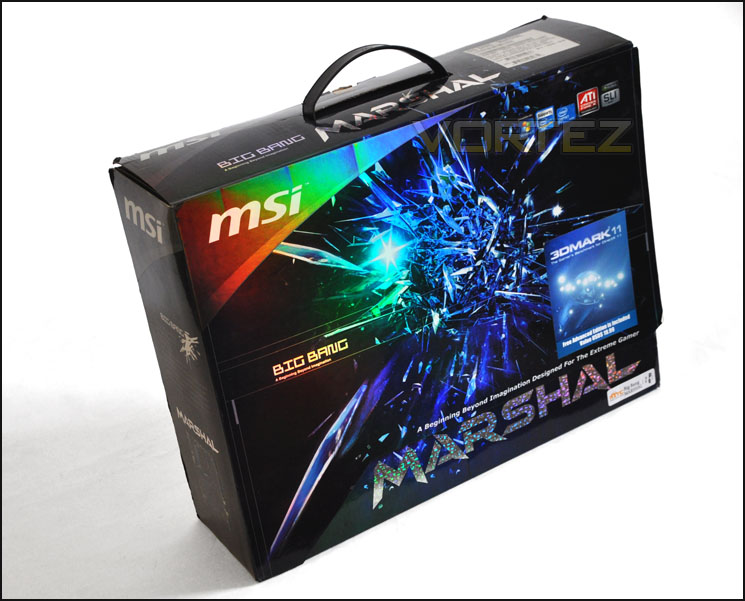
The lustre of Marshal’s packaging
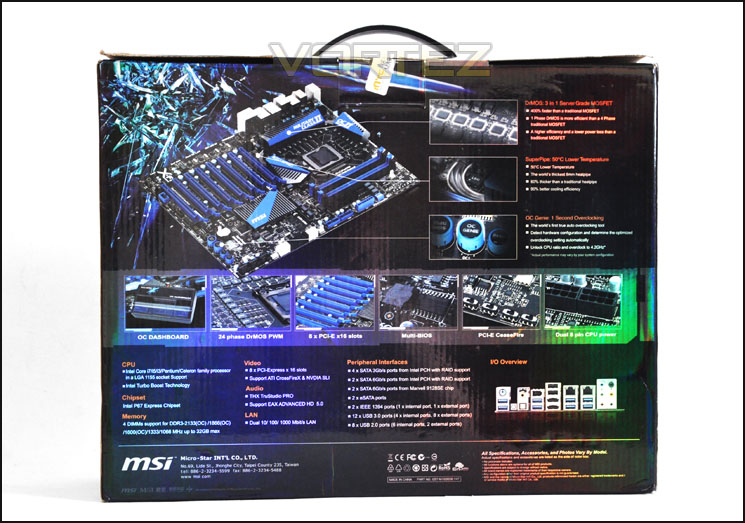
Features listed on the back
Inside the box we get countless accessories included in the bundle – every possible avenue has been covered. Included you get:
• 2 x USB 3.0 FP Plates
• OC Dashboard Multiple
• SLI bridges
• Voltage cables
• SATA cables
• PCI plate – Molex & eSATA
• I/O plate
• Quick Start Guide
• User manual
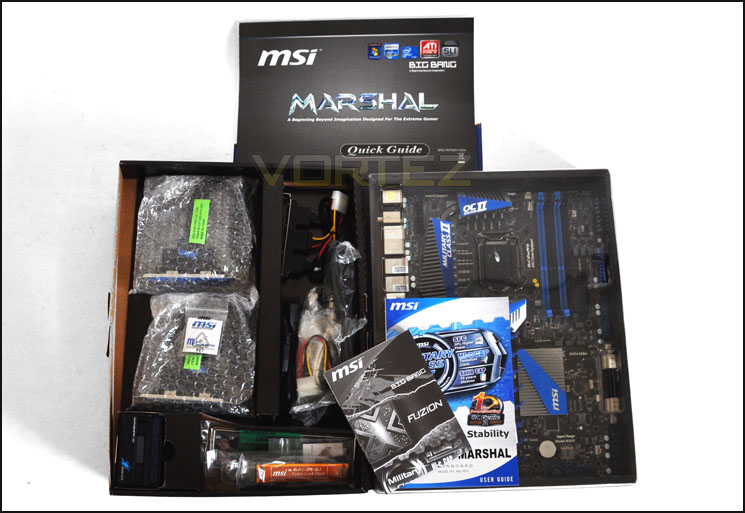
Plenty of items within the bundle
With the packaging out of the way we can finally get our first glimpse of the Marshal motherboard. This is one board not to underestimate. The immediate aspect of this board that grabs your attention are the numerous PCI-e slots… 8 in total! If you are looking for a board that will entertain 3-way SLI or 4-way CrossFireX then look no further, Marshal has the capabilities. Marshal’s feature-set is, as you can tell vigorous – offering dual USB3.0 headers, 8 USB3.0 on the I/O and high-end features for enthusiasts that are looking for more – voltage check-points and CeaseFire are there to be taken advantage of. One of the other elements that MSI are pushing with the Big Bang Marshal is the Military Class II and so there are SFC, Hi-c CAPs and Solid CAP components located throughout the motherboard – Especially around the CPU socket. If you are looking for something feature-rich then Marshal appears to have all the options – so let’s delve in and take a closer inspection.
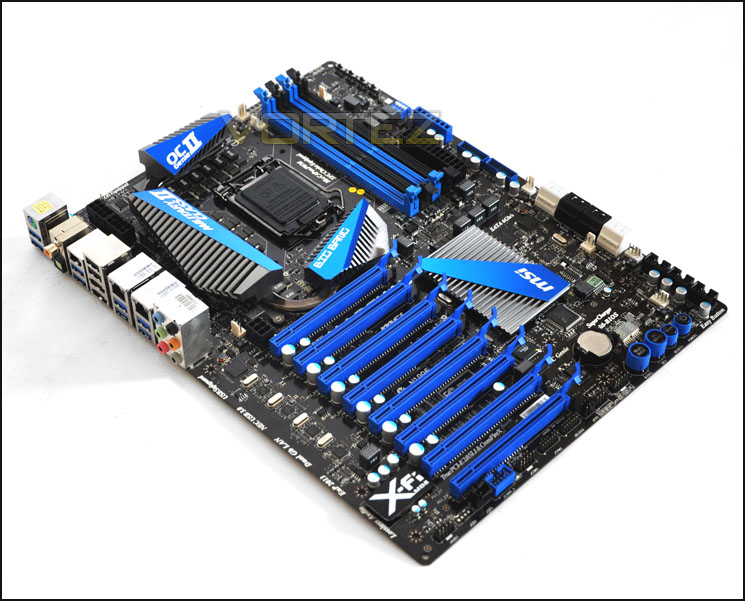
An overview of the MSI Big Bang Marshal
Closer Look
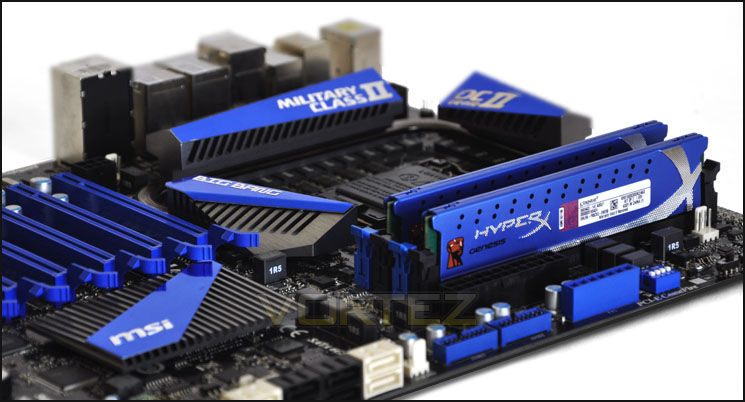
MSI have chosen to arm the Marshal with an extreme power design – 24 Phase DrMOS PWM. DrMOS are 400% faster than traditional MOSFETs, 1 Phase DrMOS is actually more efficient than a 4 Phase traditional MOSFET and is more efficient. You will notice, as on many of MSI’s motherboards there aren’t any Solid CAPs around the CPU socket – this is where Military Class II comes in, instead we have Hi-c CAPs. These Hi-c CAPs have a Tantalum Core and have up to 8 times longer lifespan when compared to a Solid CAP. We touched on these components on our trip to CeBIT earlier in the year. The design concept behind the heatsink design on Marshal is based around the military fighter jets. Being a Military Class II motherboard, Marshal carries with it this inspiration. The heatsink has the “Super Pipe” design which is 8mm thicker and offers 90% better cooling efficieny.
With a 24-Phase Power Design this motherboard is designed for extreme overclocking hence the reason we also have dual 8-pin power – providing more than 60A for more stability and lower impedance.
With Marshal being LGA1155 this board will accommodate Intel’s 2nd Generation Core i3/i5/i7 Processors. You would undoubtedly want to opt for an unlocked multiplier on this motherboard to take advantage of the overclocking features so the K series is definitely something to go for. Being LGA1155 we can install LGA1155/1156 CPU Coolers.
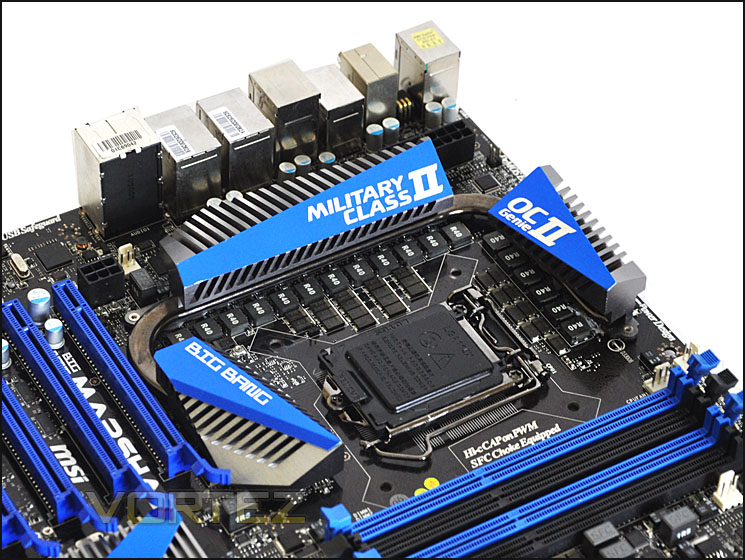
24 Phase Power Design – DrMOS
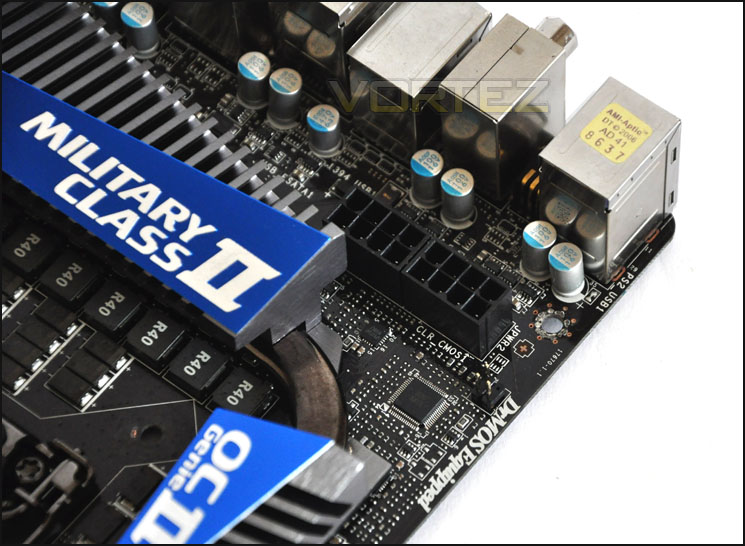
Overclocking is a power hungry game. Dual 8-pin power
In terms of memory capacity the Marshal has 4 DIMMs supporting DDR3-1066MHz to 2133MHz (OC) and a maximum capacity of up to 32GB. Around the memory slots we have Super-Ferrite Chokes (SFC) again these are included within the Military Class II series and delivers 30% higher current capacity, 10% better power efficiency for better overclocking power stability. In general even if you aren’t going to overclock SFCs are a leap in power efficiency making the motherboard much more robust and a future-proof product to invest in. In the corner we have the PCI-Express Ceasefire switches (PEG1 – PEG4). CeaseFire allows you to quickly and easily benchmark graphics cards by having a switch function to control whether or not a card is active. It even offers the ability to disable the card when you are not gaming for energy efficiency. Next to the CeaseFire controls we have a large blue connector named FV1 on the motherboard this is the Voltage-Check Point. Here we can monitor voltages of CPU, DDR3 and PCH. It gives those who are desiring it that extended functionality for ultimate performance usage.
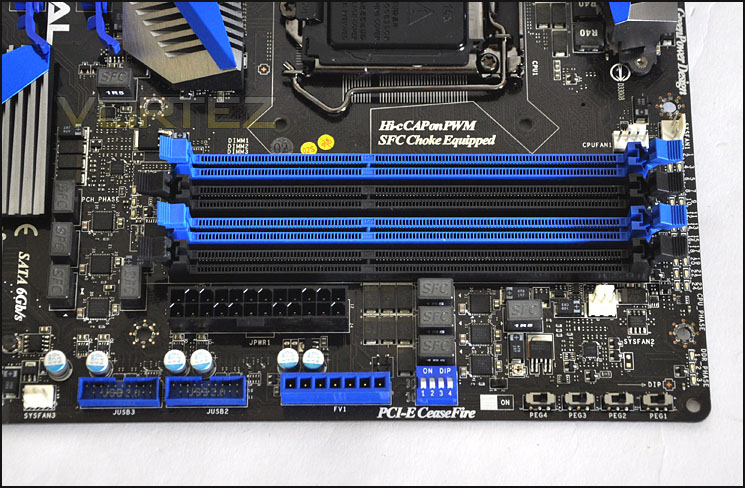
Dual channel DDR3 with a plethora of features around it including voltage-check point and PCI-E CeaseFire
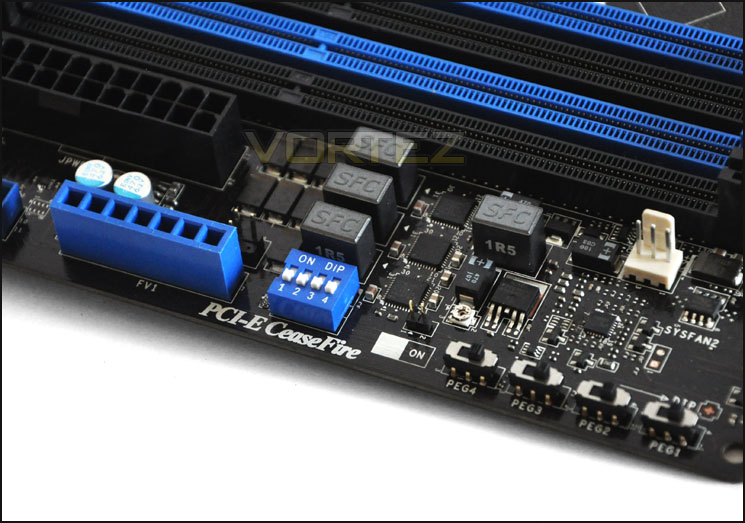
PCI-CeaseFire switches
Directly next to the Voltage Check-Point we have dual USB3.0 headers. Usually you would only have one such header but MSI have provided owners with even more expandability – why not if you have the space?
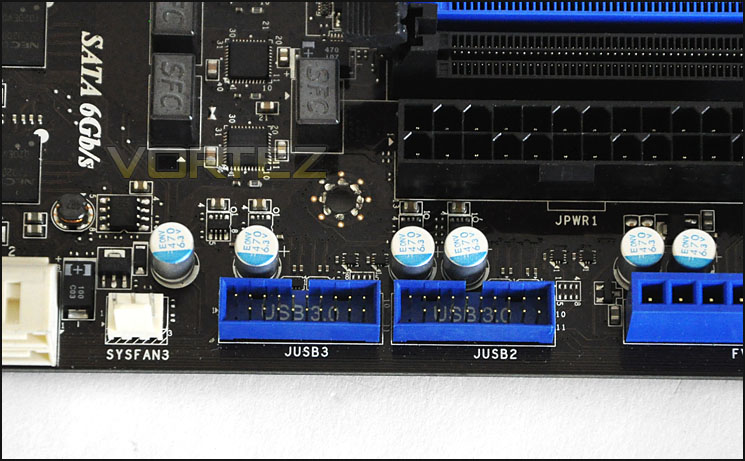
Lots of USB3.0 functionality – including 2 headers
In terms of storage options we have a selection of SATA 3Gbps and 6Gbps ports. The black ports in the middle are 3G whilst the off-white ports are 6G. The ports on the left of the picture below (off-white) are supported via Marvel SE9128 whilst all other ports via the P67 chipset.
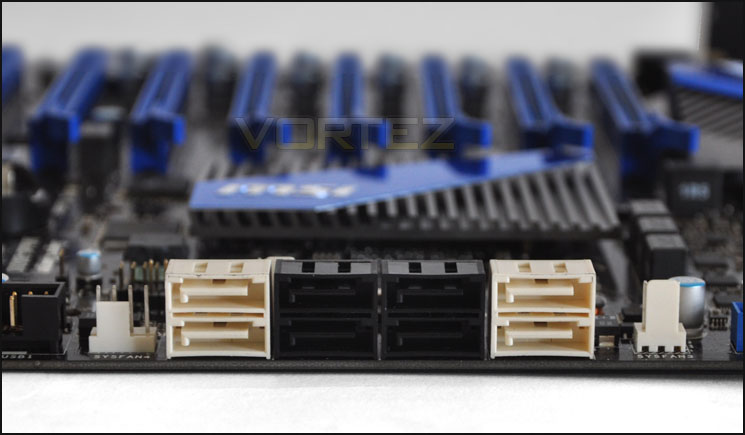
SATA ports in 3G and 6G
Closer Look (Continued)
MSI have covered the Intel P67 chip with a sufficient, oversized heatsink to dissipate heat.
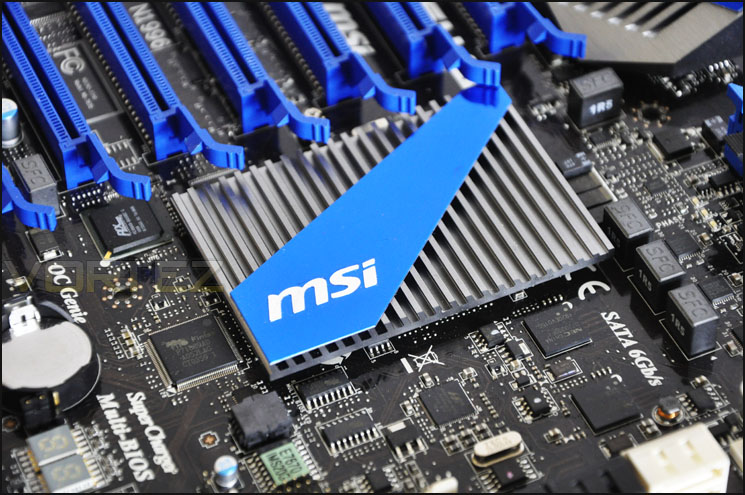
Intel P67 Chipset has been given a large heatsink
On the bottom edge of the motherboard we have the onboard controls more commonly seen on high-end MSI motherboards. These buttons are a ‘must-have’ for any hardware enthusiast and certainly for those who are using the motherboard on a test bench. Multi-BIOS allows you to switch between different BIOS should you come up against any stability issues. Whilst the OC Genie (Genie II) will boost the CPU ratio, memory ratio, memory timing, CPU voltage and memory voltage. This button has to be pressed whilst the system is powered down but switched on and provides a good option for the amateur overclocker for even for those who need a quick boost and are short on time! We also have the power and reset buttons that are extremely handy to use.
In the background of the image below you can notice there is an LED debug indicator. Again this is a nice feature to have as it will help to identify any problems during POST should you have any.
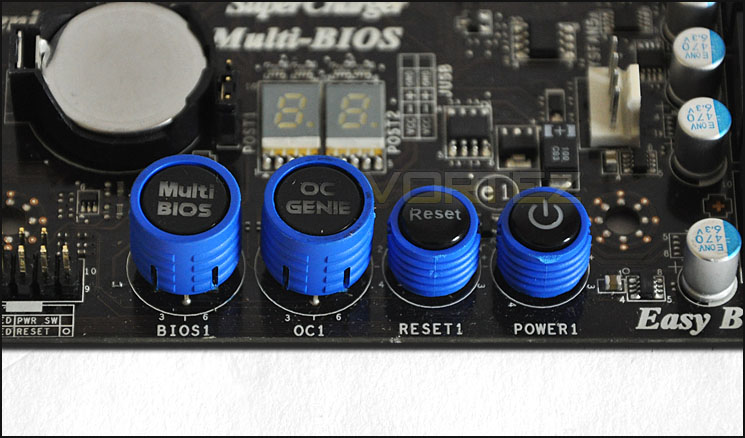
Onboard buttons offer added management
Now onto one of the main features of the Marshal – the PCI-E lanes. Marshal has 8 PCI-E lanes allowing 4-way CrossFireX (2 slot graphics cards). For up to 2-way SLI/CrossFireX we can run the graphics cards in X16 but anything over this will run in X8 mode. Lane 1 and 5 are to be used for X16 mode.
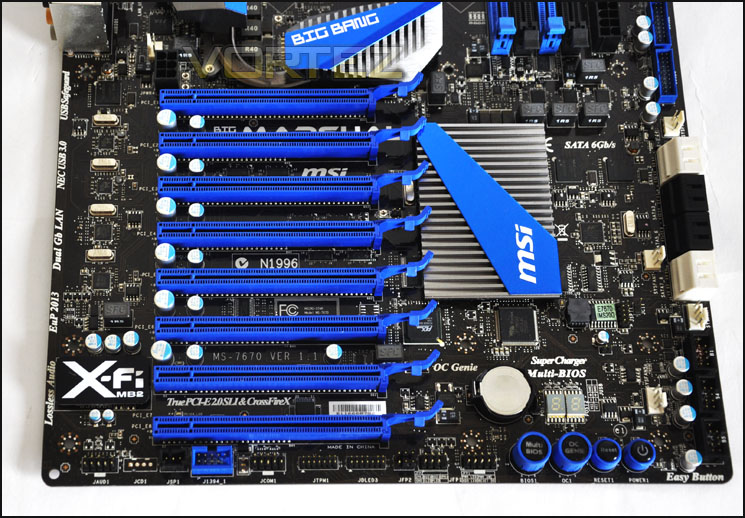
8 PCI-E lanes with the possibility of 4-way CrossfireX
To the side of the PCI-E lanes we have the audio chip that MSI have integrated onto the Marshal motherboard. MSI have teamed up with Creative to incorporate their Sound Blaster X-Fi MB2 technology this endorses EAX Advanced HD 5.0 and allows you to take advantage of THX TruStudio PRO (something we touched on in a recent review).
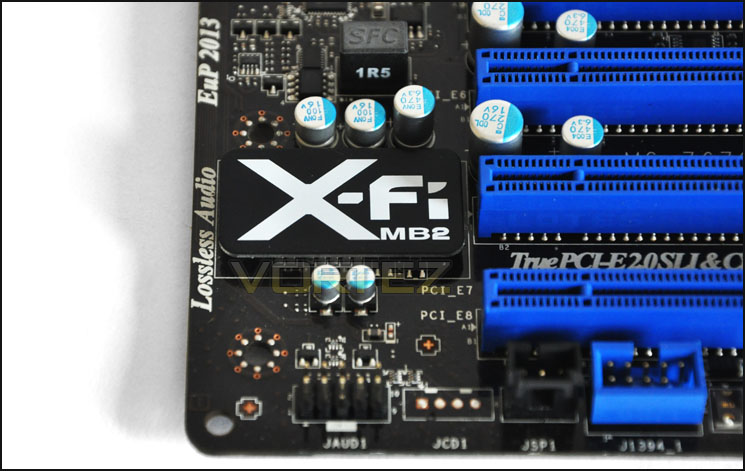
Sound Blaster X-Fi MB2 integrated
Finally, we have the I/O panel with 8 USB3.0 ports, PS2 KB/Mouse, Digital/Coaxial audio, USB2.0, eSATA, dual gigabit LAN ports, and audio jacks to correspond with the X-Fi MB2.
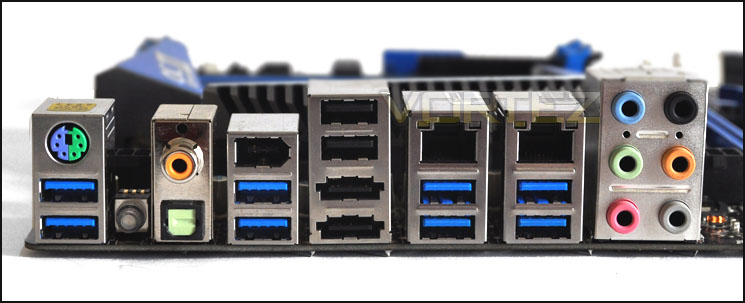
The I/O panel on the Marshal motherboard
Click BIOS
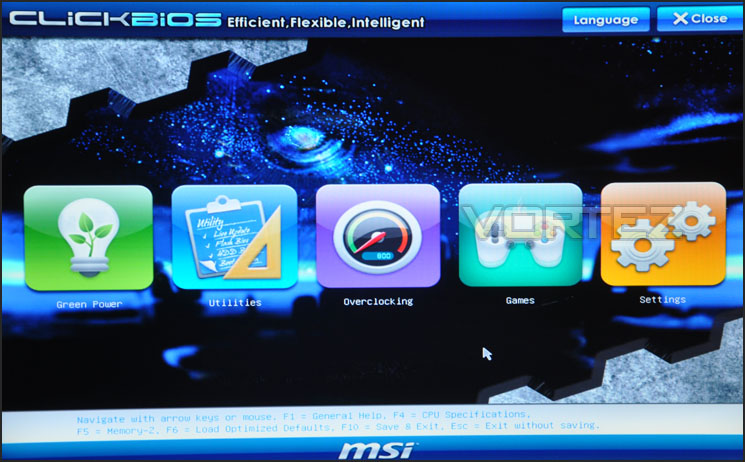
MSI have integrated what they call “Click BIOS” with the Marshal board. Click BIOS uses UEFI meaning this brings in graphical menu systems and gives us access to applications that the traditional BIOS couldn’t. UEFI is certainly something I am fond of as you can use your mouse to navigate through the BIOS and often it is an efficient process as opposed to the standard BIOS used on previous motherboards pre-2011. MSI’s Click BIOS gives support for up to 15 languages.
When you first enter Click BIOS you are met with the following options.
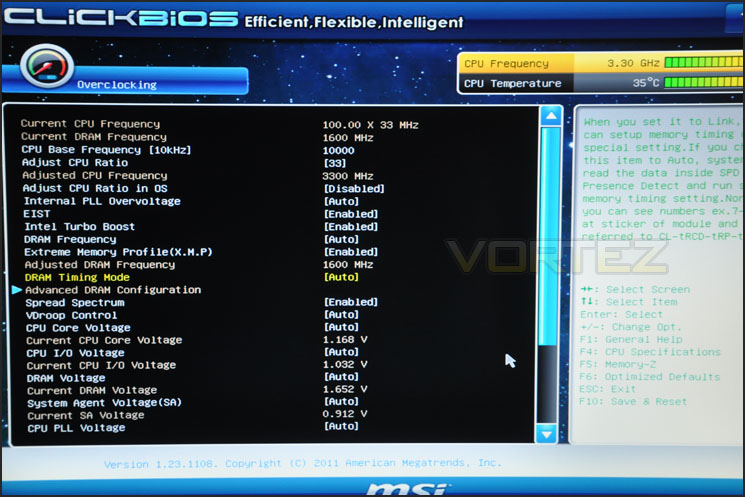
Typical settings are set out in a similar fashion to the traditional BIOS – below I have shown some of the options available under the Overclocking section. Whilst there are plenty of options there it can be difficult to navigate your way through the BIOS in a speedy manner – I know that MSI are working in the next revision of motherboards to fine-tune Click BIOS to make it a much more efficient interface.
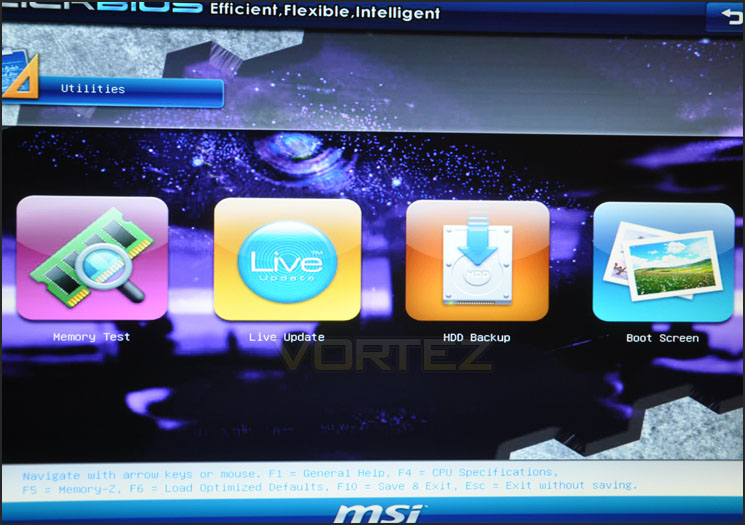
The Utilities panel offers some interesting options such as a memory test facility to diagnose any problems with your RAM. You can also tweak the boot screen, backup your HDD and perform a live update.
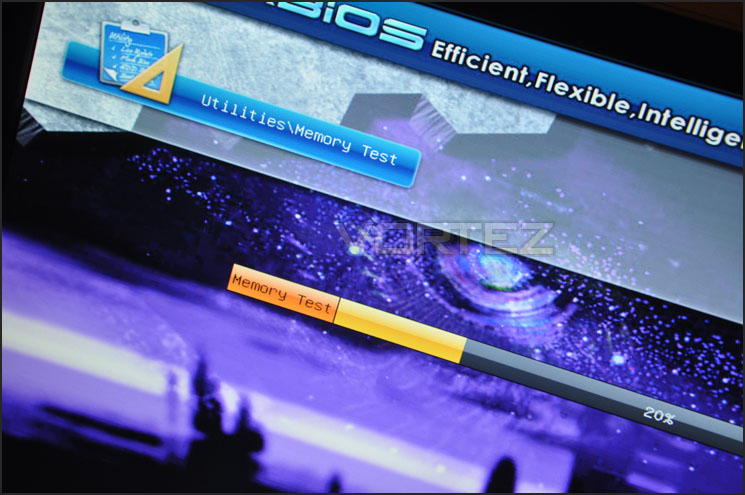
Below the memory test is running to examine whether the RAM I am using is free of errors.
Test Setup & Overclocking
CPU Intel Core i5 2500K (3.3GHz)
Motherboards
– MSI Big Bang Marshal
– ASUS Maximus IV Extreme
– GIGABYTE Z68-UD4
– Foxconn Rattler P67
– ASUS Sabertooth P67
– ASUS P8P67 (LGA1155)
– Foxconn P67A-S
– ECS P67H2-A (Black Extreme)
Memory 4GB Kingston HyperX Genesis CL9 1600MHz
CPU Cooler Noctua NH-D14
Graphics ZOTAC GTX 460
PSU OCZ Fatal1ty 750W
All P67 Sandy Bridge motherboards will be benchmarked against each other using the Intel Core i5 2500K. The maximum overclock will also be included within the proceeding benchmark tests to identify performance gains as a result of tweaking CPU clock speed via the multiplier.
Overclocking
As previously mentioned in our Intel Core i5 Sandy Bridge Roundup – overclocking is achieved by altering the multiplier rather than the BCLK. So the BCLK stays at 100MHz and the multiplier is modified. So if we have 100MHz on the BCLK and 40 for the multiplier this will obviously output 4GHz. We chose to use the Intel Core i5 2500K across each of the motherboard tests and indeed for the overclocking due to its unlocked multiplier.
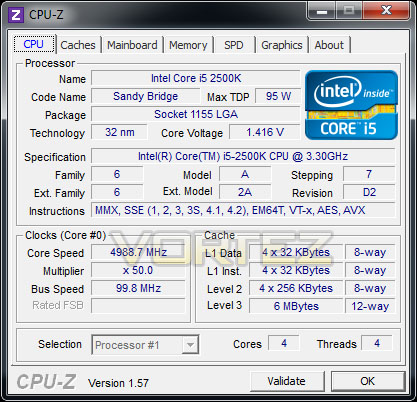
With overclocking simplified on Sandy Bridge, this means that achieving the best overclock couldn’t be easier. CPU voltage and multiplier just need to be modified accordingly. The Big Bang Marshal is no stranger to overclocking – I disabled some of the safety features in Click BIOS and began nudging the BCLK up. Upon previous attempts the best I could achieve was 4.8GHz but not with the Marshal. I was finally able to achieve 5GHz… and without too much hassle either. In the previous review I took a look at the ASUS Maximus IV Extreme and wasn’t even able to achieve 5GHz without instability and BSODs even with 1.45v CPU voltage.
5GHz was attainable with 1.4v – a significant milestone and an impressive result for the Big Bang Marshal. This clearly proves that its strengths lie in the overclocking arena.
Power Consumption
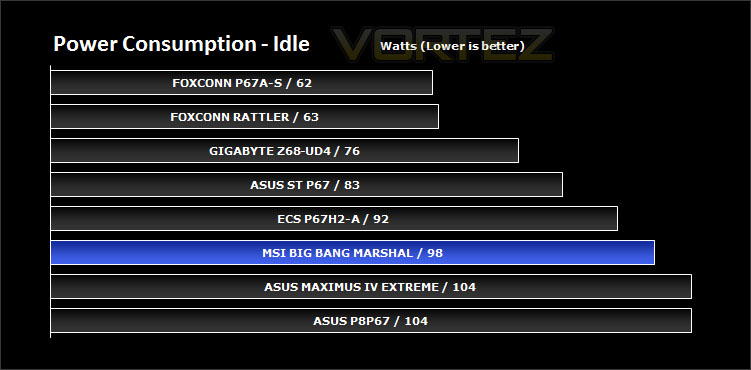
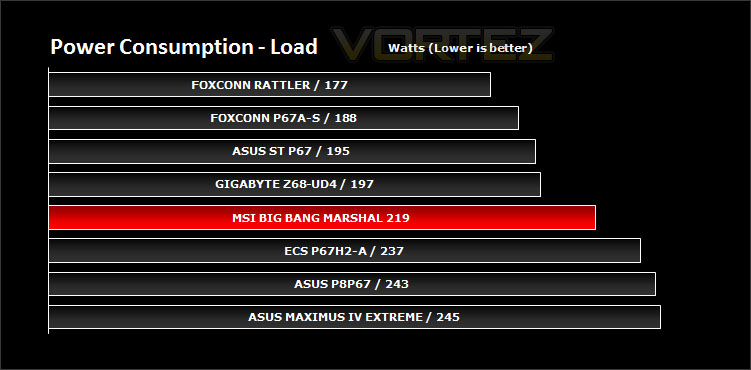
It’s interesting to note the power consumption across all motherboards. Although they are all using the P67 chipset, energy results can fluctuate between manufacturers due to the features and specifications that are integrated. First of all, for the idle tests the system is cold booted into Windows and no additional applications are executed – the watts are noted on the external energy monitor we use and then the system is loaded with 3DMark 11 – watts are again monitored for the duration of the test and the highest rated wattage result is then noted down. Below are the results of this energy test.
The Big Bang Marshal isn’t the most energy efficient of the motherboards we have tested but then again it isn’t the worst either. It comes with feature upon feature so you do expect some leeway.
Synthetic Benchmarks: AIDA64
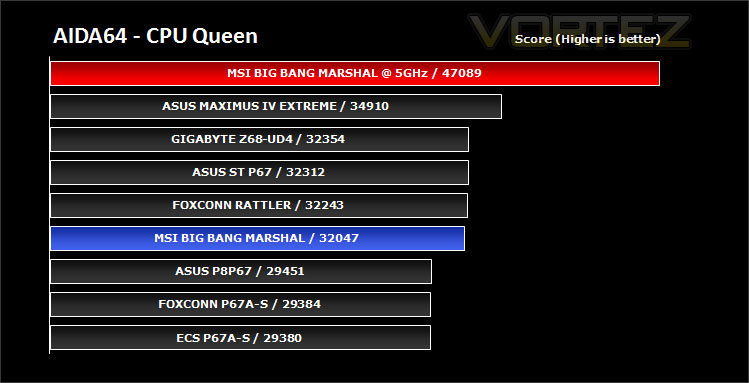
CPU QueenThis simple integer benchmark focuses on the branch prediction capabilities and the misprediction penalties of the CPU. It finds the solutions for the classic “Queens problem” on a 10 by 10 sized chessboard. At the same clock speed theoretically the processor with the shorter pipeline and smaller misprediction penalties will attain higher benchmark scores. For example — with HyperThreading disabled — the Intel Northwood core processors get higher scores than the Intel Prescott core based ones due to the 20-step vs 31-step long pipeline. CPU Queen test uses integer MMX, SSE2 and SSSE3 optimizations.
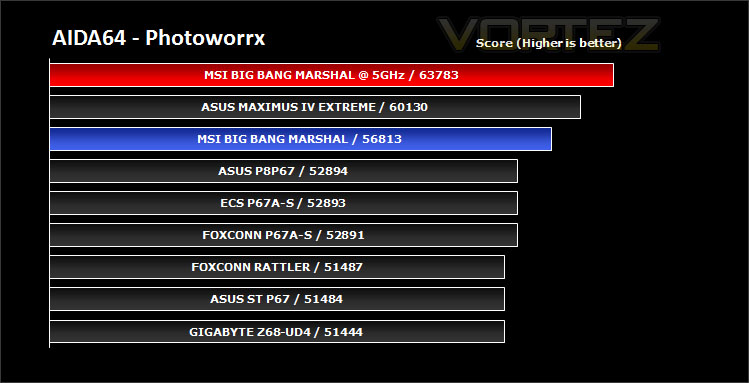
CPU Photoworrx
This benchmark stresses the integer arithmetic and multiplication execution units of the CPU and also the memory subsystem. Due to the fact that this test performs high memory read/write traffic, it cannot effectively scale in situations where more than 2 processing threads used. For example, on a 8-way Pentium III Xeon system the 8 processing threads will be “fighting” over the memory, creating a serious bottleneck that would lead to as low scores as a 2-way or 4-way similar processor based system could achieve. CPU PhotoWorxx test uses only the basic x86 instructions, and it is HyperThreading, multi-processor (SMP) and multi-core (CMP) aware.
CPU AES
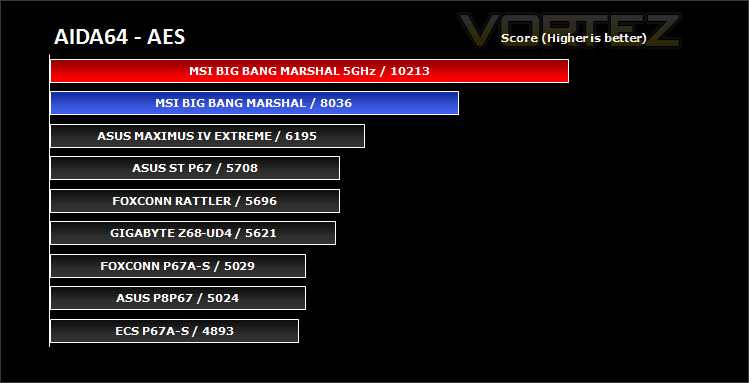
This benchmark measures CPU performance using AES (Advanced Encryption Standard) data encryption. In cryptography AES is a symmetric-key encryption standard. AES is used in several compression tools today, like 7z, RAR, WinZip, and also in disk encryption solutions like BitLocker, FileVault (Mac OS X), TrueCrypt.
CPU AES test uses only the basic x86 instructions, and it’s hardware accelerated on VIA PadLock Security Engine capable VIA C3, VIA C7 and VIA Nano processors; and on Intel AES-NI instruction set extension capable processors. The test is HyperThreading, multi-processor (SMP) and multi-core (CMP) aware.
CPU AES test uses only the basic x86 instructions, and it’s hardware accelerated on VIA PadLock Security Engine capable VIA C3, VIA C7 and VIA Nano processors; and on Intel AES-NI instruction set extension capable processors. The test is HyperThreading, multi-processor (SMP) and multi-core (CMP) aware.
FPU Mandel
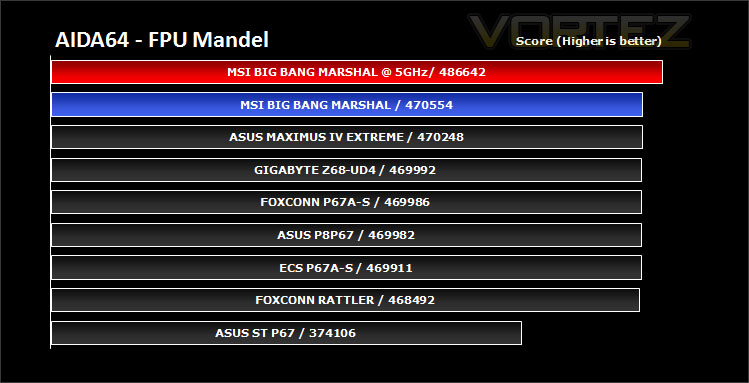
This benchmark measures the double precision (also known as 64-bit) floating-point performance through the computation of several frames of the popular “Mandelbrot” fractal. The code behind this benchmark method is written in Assembly, and it is extremely optimized for every popular AMD, Intel and VIA processor core variants by utilizing the appropriate MMX, MMX+/SSE, SSE2, SSSE3, or AVX instruction set extension. FPU Mandel test is HyperThreading, multi-processor (SMP) and multi-core (CMP) aware.
Synthetic Benchmarks: x264 HD
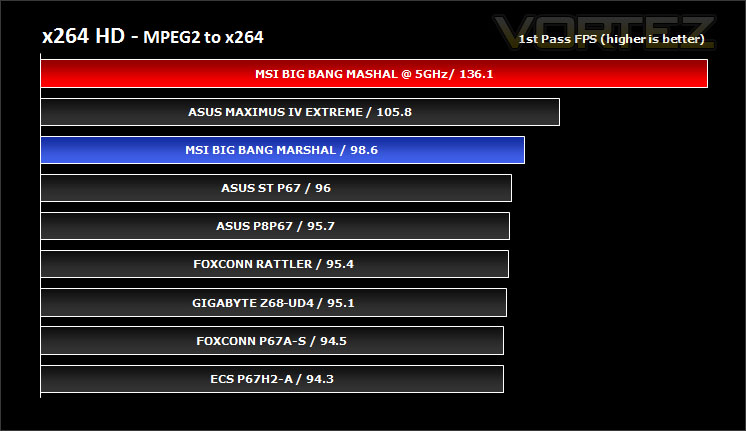
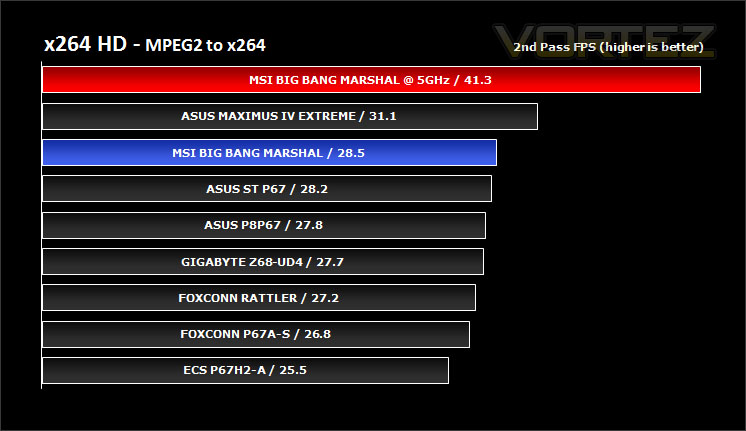
Simply put, this test measures how fast your machine can encode a short, DVD quality MPEG-2 video clip into a high-quality x264 video clip. What’s x264, you ask? It’s more or less the next-generation Xvid/DivX codec. I think it’s ideal for a benchmark because the application (x264.exe) reports fairly accurate compression results (in frames per second) for each pass of the video encoding process, and it uses multi-core processors very efficiently.
x264 HD gives results for 2 passes when compressing an MPEG-2 clip into x264. It presents 4 separate results for each pass giving a total of 8 – all results are given in FPS. For each pass I have averaged out the results.
With stock CPU settings the Marshal motherboard sits in a respectable position but overclocking clearly indicates a distinct improvement whilst encoding, so it’s a worthwhile thing to overclock – those investing in this motherboard would be foolish not to anyway!
Synthetic Benchmarks: Cinebench 11.5
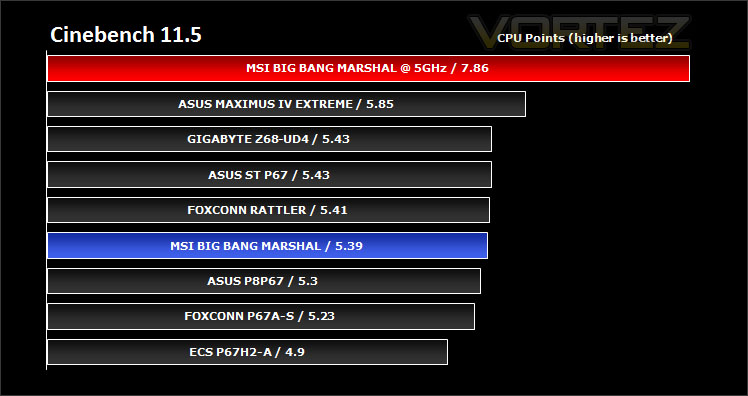
CINEBENCH can measure systems with up to 64 processor threads. This test scene contains approximately 2,000 objects which in turn contain more than 300,000 polygons in total, and uses sharp and blurred reflections, area lights, shadows, procedural shaders, antialiasing, and much more. The result is displayed in points (pts). The higher the number, the faster your processor.
Cinebench produces neat and easy to understand results, giving a quite representative overall CPU performance. MSI’s Big Bang Marshal again sits at a respectable position – the results between each motherboard are actually very similar. Overclocking the 2500K to 5GHz provides a pleasant increase in CPU points score.
Synthetic Benchmarks: SiSoftware SANDRA 2011
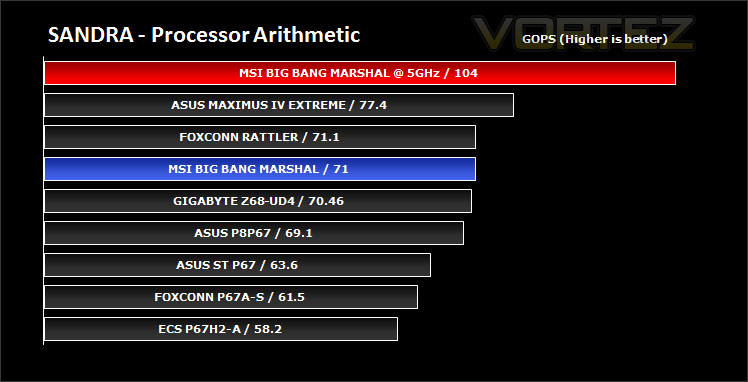
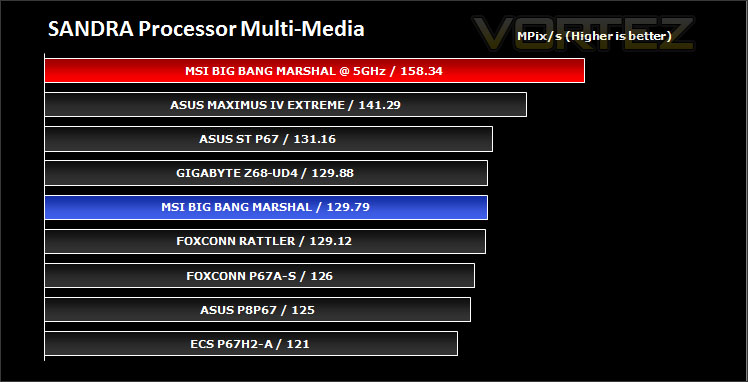
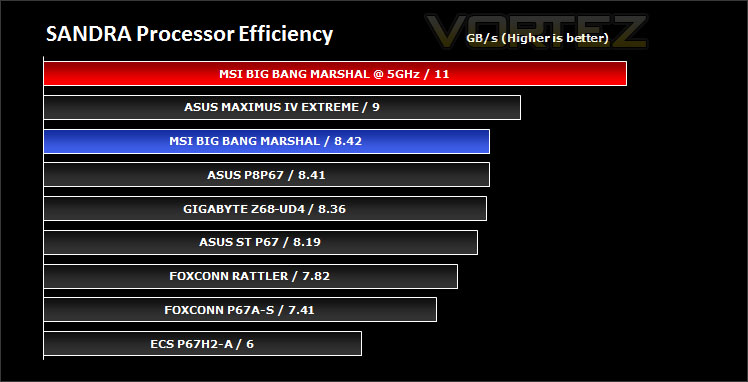
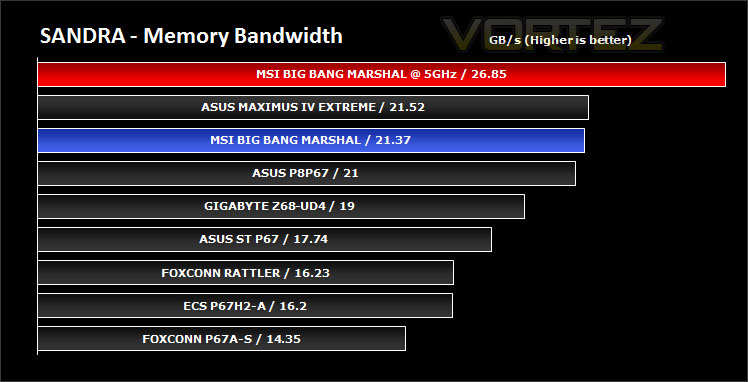
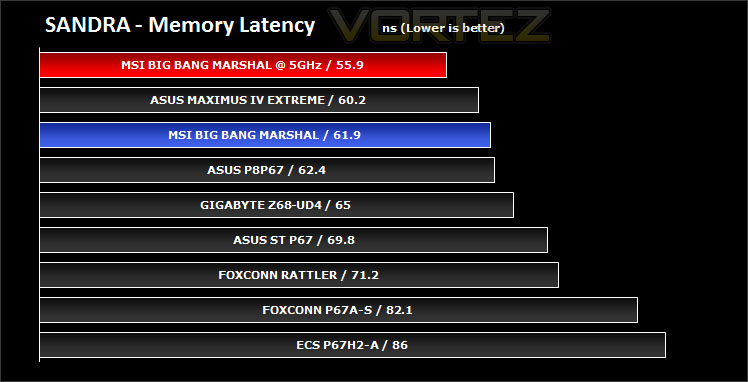
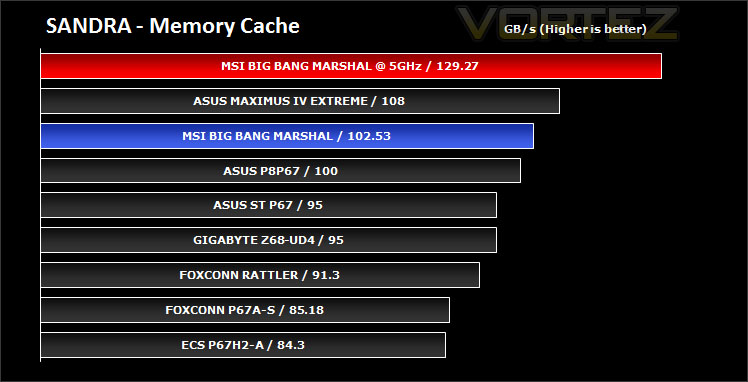
SANDRA isn’t always a benchmark that is included in hardware reviews but I believe it shouldn’t be ignored. SANDRA provides a vigorous package that tests your system in a rather large array of benchmarks. There are many aspects of benchmark that can be executed. We will be considering – CPU and memory tests.
Processor tests – In the processor tests the Big Bang Marshal performs admirably. Whilst it isn’t a leader with the stock clock speed it still offers strong performance against the other motherboards tested. Overclocking provides added bandwidth and again is strongly advised.
Memory tests– In these tests the Big Bang Marshal was amongst the best motherboard, falling just behind the Maximus IV Extreme by a very nominal value. Overclocking provides a nice improvement to GB/s.
Synthetic Benchmarks: 3DMark 11
Designed to measure your PC’s gaming performance 3DMark 11 makes extensive use of all the new features in DirectX 11 including tessellation, compute shaders and multi-threading. Trusted by gamers worldwide to give accurate and unbiased results, 3DMark 11 is the best way to consistently and reliably test DirectX 11 under game-like loads.
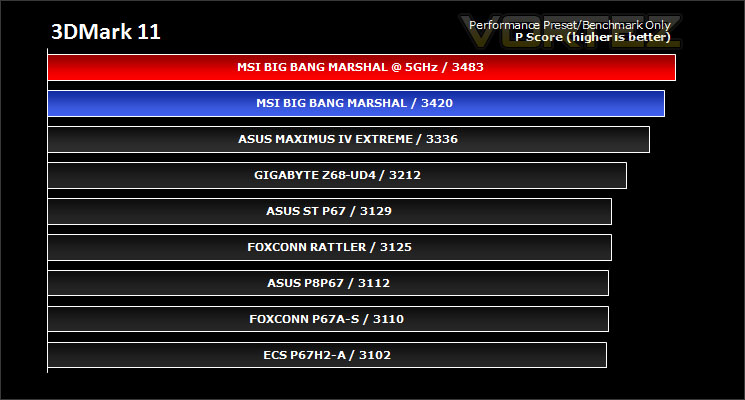
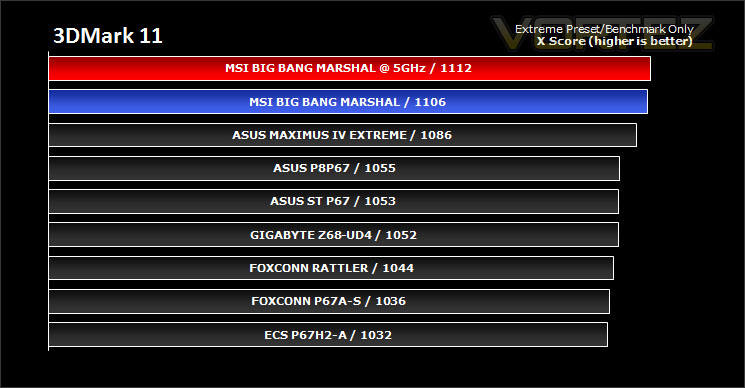
3DMark 11 was released at the end of last year and needs little introduction. For the test settings both Performance and Extreme presets are run with ‘benchmark only’ being selected. This provides good analysis. Many will only test the performance preset, using the extreme mode we can examine the board under much more severe stressing.
There isn’t much to separate the motherboards in both our performance and extreme 3DMark 11 benchmarks. However the Big Bang Marshal does provide more points within both presets. 3D performance is another of this boards qualities.
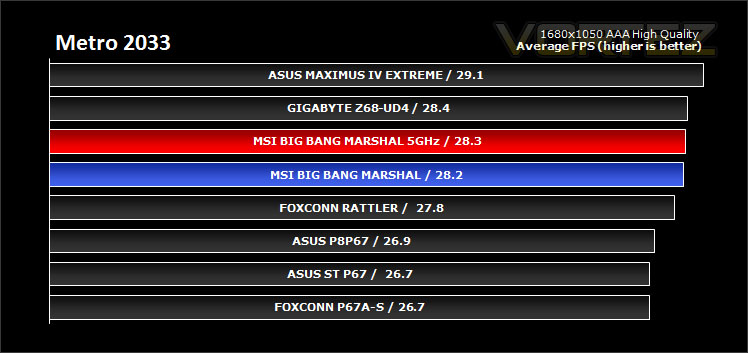
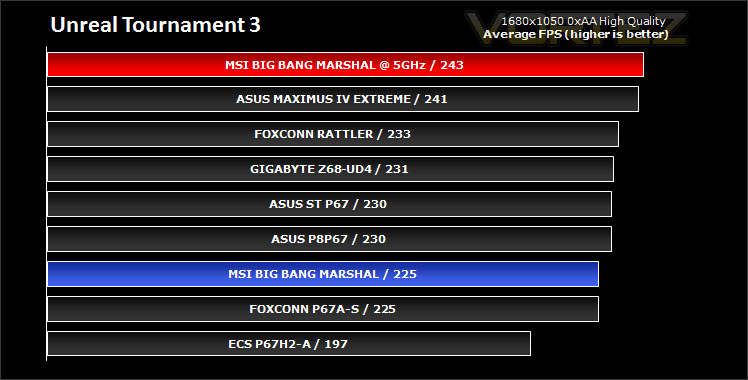
Game Benchmarks: DIRT 2, Call of Duty Black Ops, Metro 2033. UT3
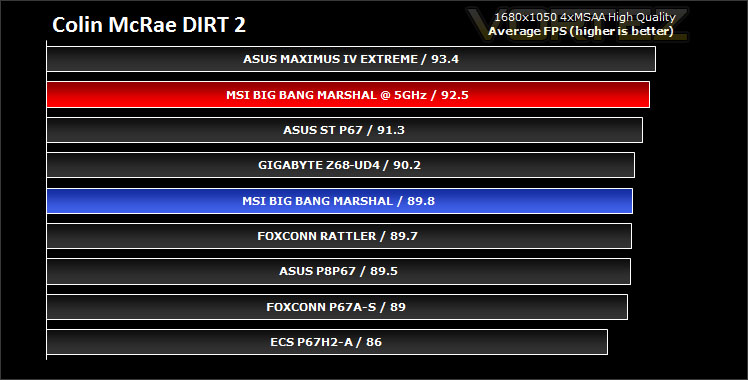
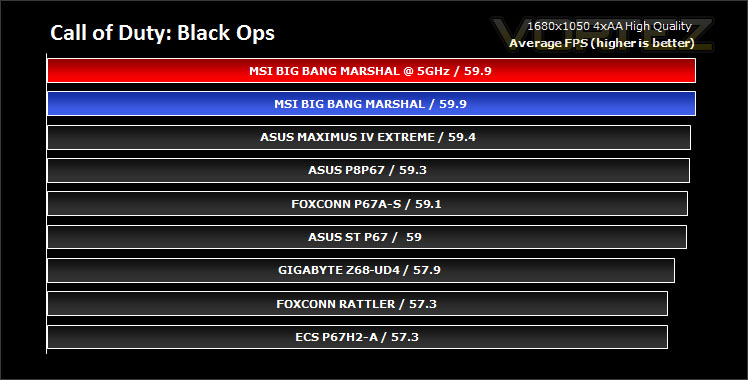
It’s important for us to perform a number of game benchmarks as well as the synthetic tests because many of our motherboards on the test bench have features which market them directly at gamers. So here we have a selection of popular gaming titles, critically acclaimed and action-packed.
Gaming performance across each of the motherboards is marginal, nevertheless this still indicates that it is a strong performer.
Lucidlogix HYDRA Performance
MSI have integrated a Lucid HYDRA 200 chip onto the Big Bang Marshal motherboard to allow users to combine NVIDIA and AMD graphics cards. With the Intel P67 Chipset having no Northbridge, MSI have placed it right where the Northbridge would typically sit. This works well as the cooling heatsinks can extend to provide efficient cooling for the chip during operation.
There has been much speculation over the subject of HYDRA in recent months with much of the media claiming that such a technology is un-needed and troublesome. Richard recently examined a new graphics card from HIS specifically designed for combing NVIDIA and AMD cards alike since it has an integrated HYDRA chip on it. Here is some information on HYDRA from this article: HIS HD6970 MIX Review
For the purpose of testing I will be combining the ZOTAC GTX 460 and ASUS HD 6950 graphics cards in the Lucid HYDRA test. These cards are of similar speed (the AMD card slightly faster), its useful when testing out this technology to combine cards of a similar stature. For example, it would be stupid to test a GTX 460 with an AMD 6990.
Of the 4 games that I benchmarked through this review only 2 of them actually allowed me to report back on the results since Black Ops and UT3 crashed out. For this test I used the following drivers:
Lucid HYDRA 1.7.105
NVIDIA 275.33
ATI Catalyst 11.4
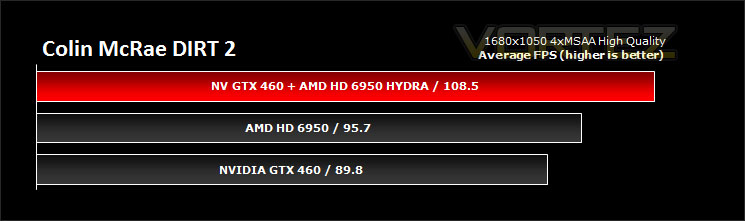
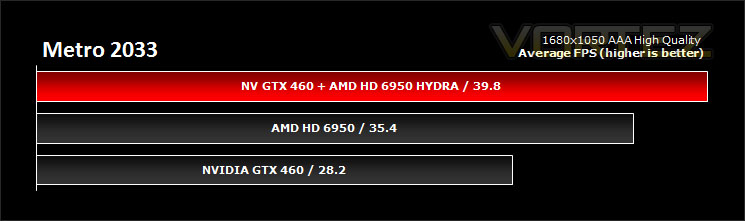
Although the above test to show Lucid HYDRA performance isn’t extensive it gives a rough idea of what to expect. 2 /4 games worked and of the 2 that did work combining both graphics cards resulted in only a slight improvement. It would prove much more effective to SLI or Crossfire.
As we have mentioned in other articles and after other media have reported, Hydralogix need to work on improving their drivers and compatibility with games if we are to put our confidence in this new technology. For the present it does indeed appear troublesome and found wanting.
Conclusion
There has been plenty of talk surrounding MSI’s Big Bang Marshal over the months and at the trade shows its featured at – and rightly so, this colossal motherboard delivers a multitude of useful features and can support Quad-CrossFireX. As we have shown in the overclocking stages, Marshal easily attained 5GHz – unlike many of the other motherboards we have tested that couldn’t quite make it.
Its strengths come with the array of features. 24-Phase DrMOS power enables the power and efficiency needed to take the CPU to new heights. That’s not all either, being a Military Class II motherboard Marshal’s componentry around the CPU socket (and indeed throughout the motherboard) features Super Ferrite Chokes, Hi-c CAPs and Solid CAPs for better stability and extended durability. MSI’s campaign to provide higher-quality motherboards is working extremely well, other manufacturers seem to be continuing to use older methods whilst MSI invest and research in better, more reliable ways to give general, power and extreme users the kind of products they deserve. Have a read about Military Class II in our article from CeBIT.
Stock performance was strong and although it did indicate similar performance figures compared to other motherboards tested such as the ASUS P8P67 and Maximus IV Extreme – overclocking portrayed a key advantage. Those who would be investing in such a motherboard would surely have overclocking in mind since this board is geared towards this with all the military grade components and 24-Phase power!
If manual overclocking scares you to death there is always the option of MSI’s OC Genie. With a quick press whilst the computer is down, you can power up to a pleasant overclock beyond 4GHz. For the amateur overclocker, this feature will pave the way and perhaps encourage to getting to grips with tweaking the settings manually – especially after they see the rewards for doing so. Ideally though, because Marshal costs such a premium users really ought to be taking advantage of all of its overclocking support.
Now on to the topic of cost. MSI have really gone ‘all out’ with the Big Bang Marshal and it’s no surprise that doing so means the cost for the end user is going to be higher than a good chunk of other high-end motherboards on the market. Just putting this into perspective – Military Class II components throughout, 24-Phase DrMOS design, 12 x USB3.0 ports (2 x USB3.0 headers) with 3 NEC chips, 2 x Realtek NIC IC, Lucid Hydra chip, 8 x PCI-E, Voltage-Check Points, CeaseFire, Click BIOS and more… If you still can’t understand why Big Bang Marshal is so expensive then you probably need more sleep. All of these features and components translate to approximately £260 inc. VAT. It’s difficult to justify spending so much on a motherboard but readers can surely appreciate the calibre of this motherboard and understand that there is nothing quite like it around and you are investing in something very special.
Bottom line is: Big Bang Marshal is the ultimate motherboard offering that will keep power and extreme users entertained for a long, long time. It does come at a high cost but bearing in mind the componentry involved you can appreciate that this board is feature laden and very special.
Pros
+ Military Class II – Super Ferrite Chokes, Hi-c CAPs, Solid CAPs
+ 24-Phase DrMOS – Extremely good overclocker
+ Lucid Hydra for flexible multi-GPU
+ Extreme features – Voltage Check-Points, CeaseFire
+ Solid performance
+ Sound Blaster X-Fi
Cons
– Cost
– Click BIOS isn’t as fluid as it could be
+ Military Class II – Super Ferrite Chokes, Hi-c CAPs, Solid CAPs
+ 24-Phase DrMOS – Extremely good overclocker
+ Lucid Hydra for flexible multi-GPU
+ Extreme features – Voltage Check-Points, CeaseFire
+ Solid performance
+ Sound Blaster X-Fi
Cons
– Cost
– Click BIOS isn’t as fluid as it could be


